
Cloud Sync, Backups & Vault Export
SnippetHub combines real-time cloud synchronization with comprehensive data ownership. You can seamlessly synchronize your library across workstations or export your entire knowledge base into open, portable formats.
Real-Time Cloud Synchronization
SnippetHub uses an offline-first Firebase backend to securely store and sync your snippets in the cloud.
Authentication Options
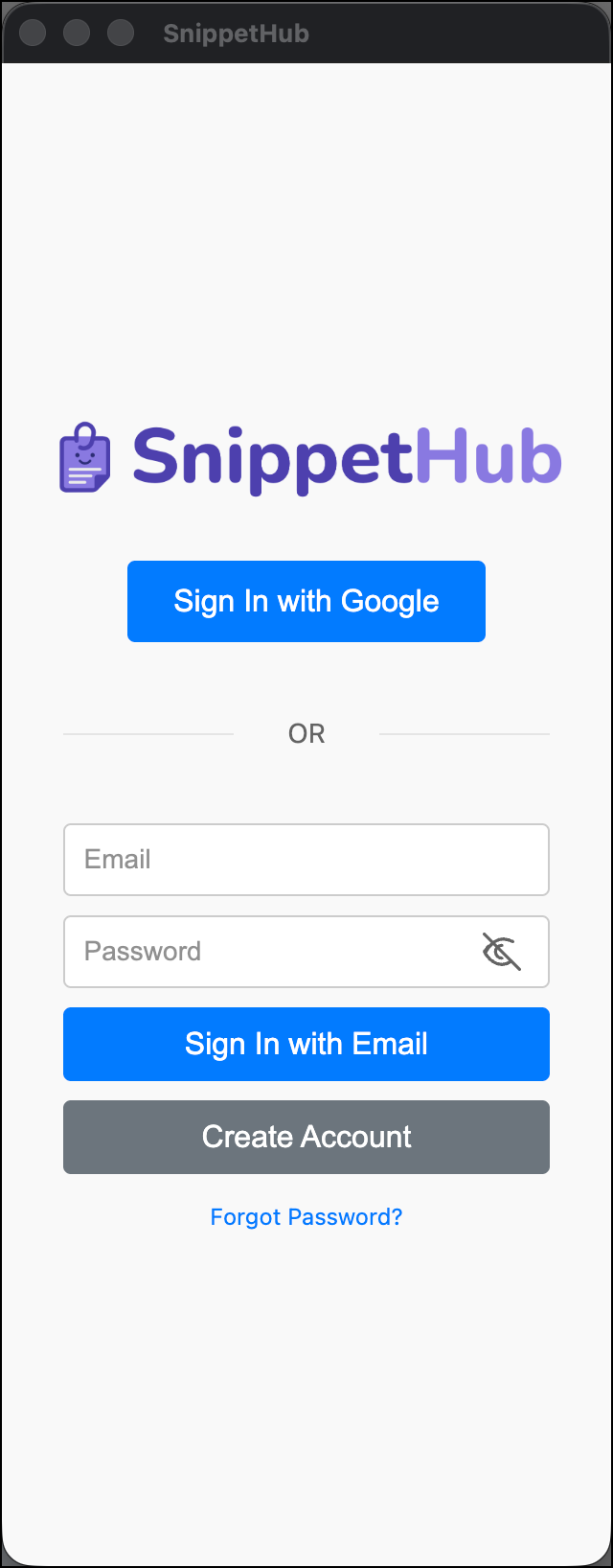
SnippetHub gives you flexible, privacy-respecting sign-in choices:
- Google Single Sign-On: Click Sign In with Google for instantaneous one-click authentication linked to your active Chrome browser profile.
- Email and Password: Sign in using your personal or work email address.
- Create Account: Don’t have an account yet? Toggle to the Create Account tab in the sign-in dialog to register with your email address and a secure password.
- Forgot Password / Password Reset: If you ever forget your password, click Forgot Password?. SnippetHub automatically pre-fills your entered email address and sends a password reset link to your inbox.
- Inline Error Feedback & Status: Friendly, human-readable error messages appear directly within the dialog if an email is misspelled or a password needs attention, with smooth focus management.
Once authenticated, your snippets, folders, custom emojis, color accents, tag colors, and drag-and-drop ordering sync continuously across every Chrome installation where you are signed in.
Focus-Driven Sync & Offline Resilience
- Offline-First: SnippetHub caches all snippets in Chrome’s local storage. You can create, edit, search, and copy snippets without an active internet connection.
- Instant Local Broadcast: When you create, edit, or reorder snippets in one tab or the standalone companion window, changes are immediately broadcast to all other open tabs in 0ms via
chrome.storage.onChanged. - Intelligent Focus Refresh: When returning to your browser from another device, SnippetHub verifies cache freshness with the background service worker using a 5-minute cooldown timer. This eliminates redundant database queries and extends laptop battery life while keeping your multi-device library up to date.
- Order Persistence: Your custom drag-and-drop ordering and sort mode preferences are persisted and synced across login sessions.
Vault Export (.zip) — Obsidian & Notion Compatible
SnippetHub features a zero-dependency, pure client-side PKZIP archive engine (src/sidepanel/utils/zip.js) that transforms your snippet library into an open-standard Markdown knowledge vault.
snippets_vault.zip├── Support/│ ├── Welcome Email.md│ └── Refund Policy.md├── Engineering/│ ├── Docker Compose Template.md│ └── Postgres Connection String.md└── Quick Notes.mdVault Markdown Structure
Each snippet is exported as an individual Markdown file inside a subfolder matching its SnippetHub folder. Every file begins with clean, standardized YAML frontmatter fully recognized by Obsidian, Notion, Logseq, and static site generators:
---title: "Customer Welcome Email"category: "Templates"tags: ["email", "onboarding"]keyword: ";welcome"folder: "Support"created: "2026-03-01"updated: "2026-03-10"favorite: truepinned: false---
# Customer Welcome Email
Hi there,
Welcome to **SnippetHub**! We are thrilled to have you on board.
Benefits of Vault Export
- Zero Lock-In: Drag the unzipped folder directly into Obsidian or import it into Notion to use your snippets as a permanent local wiki.
- Preserved Timestamps: Internal MS-DOS file timestamps in the ZIP match your snippet’s
updatedAtandcreatedAtdates. - Safe Filenames: Special characters (like slashes, colons, and question marks) are automatically sanitized, and identical titles receive unique suffixes to avoid file overwrites.
Multiple Export Formats
Export your entire library from the user avatar menu under Data:
| Format | File Extension | Details |
|---|---|---|
| Vault (.zip) | .zip | Hierarchical folder structure of individual Markdown files with YAML frontmatter. |
| JSON | .json | Complete programmatic backup including snippets, folder metadata (emojis & color swatches), custom tag colors, and UI preferences. |
| Markdown | .md | A single compiled Markdown file with horizontal rule separators and frontmatter headers. |
| CSV | .csv | Spreadsheet-ready export containing Title, Category, Tags, Folder, Copy Count, Last Used timestamp, and plaintext content. |
Bulk Subset Export
You can export a targeted subset of your library rather than everything:
- Click the Bulk Edit button in the list header (or hold
Shiftwhile clicking snippet cards). - Select the specific snippets you wish to export.
- In the floating Bulk Action Bar, click Export.
- Choose Export as Vault (.zip), JSON, Markdown, or CSV. Only your selected items will be bundled and downloaded.
Hardened JSON Import
To restore your snippets or migrate from another device:
- Click your avatar icon in the top-right corner of the side panel.
- Under the Data section, select Import from JSON….
- Choose your SnippetHub JSON backup file.
- SnippetHub safely parses, sanitizes, and imports your snippets, folders, and metadata, merging new items without overwriting your existing library.
Import Security Protections
SnippetHub’s import parser incorporates multi-layered defensive security checks:
- Prototype Pollution Defense: Key sanitization strips
__proto__,constructor, andprototypekeys from imported folder metadata, category palettes, and tag colors. - Batch Ceiling: Imports are strictly capped at 500 snippets per file to prevent browser out-of-memory crashes.
- File Size Ceiling: Files larger than 10MB are rejected prior to parsing.
- HTML Sanitization: All incoming snippet HTML content is filtered through a strict allowlist sanitizer, neutralizing
<script>,<svg onload>, inline event handlers, and malicious styles before insertion into your library.
Cloud Security & Multi-Tenant Isolation
SnippetHub’s cloud backend is powered by Google Cloud Firestore with production security rules (v2):
- Strict Identity Enforcement: Every Firestore document query and mutation is bound to
request.auth.uid == userId. It is impossible for another user to view, edit, or delete your snippets. - Payload Validation: Server-side security rules enforce string length constraints, type safety (
is string,is list,is bool,is number), and an absolute 1MB document ceiling. - Isolated Background Bridge: Firestore operations run within an isolated extension offscreen document, completely separated from web page content scripts.